将Canonical Ubuntu升级到最新版本
本指南将引导您通过一个简化的流程使用预构建包更新系统,同时保留您现有的环境。更新是在运行Ubuntu、Windows®或macOS®的主机电脑执行,以确保您的设备能够从性能、安全性和兼容性方面的最新改进中受益。
- 开始之前 - 完成🔗设置步骤。
🏁 让我们开始吧!
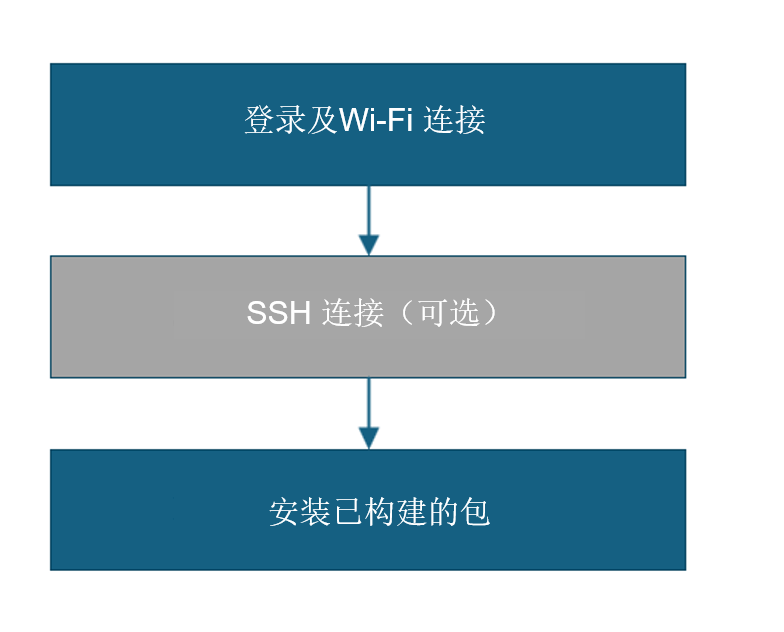
1️⃣ 登录和Wi-Fi连接
a. 在显示器UART控制台/SBC终端上登录并更改密码。
b. 设置Wi-Fi连接。🔗 Wi-Fi设置指南
2️⃣ SSH连接(可选)
a. 获取魔方派 3 的 IP 地址。
b. 在您的主机上,使用 SSH 连接到设备。
ssh ubuntu@<IP Address>
3️⃣ 升级预构建包
此命令将在设备上升级到最新的预构建包。
sudo apt upgrade -y
如果您是Ubuntu新手,且您的软件版本基于QLI或Android构建,请按照刷写Canonical Ubuntu 24.04路径进行刷写。
如果您之前没有安装PPA包,请运行以下步骤来安装:
git clone -b ubuntu_setup --single-branch https://github.com/rubikpi-ai/rubikpi-script.git
cd rubikpi-script
./install_ppa_pkgs.sh
Details
脚本安装以下内容
-
安装AI示例应用程序包。
(gstreamer1.0-plugins-base-apps, gstreamer1.0-qcom-python-examples, gstreamer1.0-qcom-sample-apps gstreamer1.0-tools, libqnn-dev, libsnpe-dev, qcom-adreno1, qcom-fastcv-binaries-dev qcom-libdmabufheap-dev, qcom-sensors-test-apps, qcom-video-firmware, qnn-tools, snpe-tools tensorflow-lite-qcom-apps, weston-autostart, xwayland)
-
安装魔方派 3 摄像头、wiringrp和wiringrp_python包。
-
安装通用开发工具相关包。 (ffmpeg, net-tools, pulseaudio-utils, python3-pip, selinux-utils, unzip, v4l-utils)
-
执行
sudo apt upgrade操作。
如果包安装失败,请运行以下命令:apt --fix-broken install
如果您遇到以下错误,请重新运行install_ppa_pkgs.sh脚本。
GPG error: http://apt.thundercomm.com/rubik-pi-3/noble ppa InRelease: The following signatures couldn't be verified because the public key is not available:
成功运行install_ppa_pkgs.sh后,您可以在显示器上看到以下屏幕。

4️⃣ 验证软件版本
在设备shell中运行以下命令来验证版本:
cat /etc/os-release
输出:
NAME="Ubuntu"
VERSION_ID="24.04"
VERSION="24.04.2 LTS (Noble Numbat)"
VERSION_CODENAME=noble
ID=ubuntu
ID_LIKE=debian
HOME_URL="https://www.ubuntu.com/"
SUPPORT_URL="https://help.ubuntu.com/"
BUG_REPORT_URL="https://bugs.launchpad.net/ubuntu/"
PRIVACY_POLICY_URL="https://www.ubuntu.com/legal/terms-and-policies/privacy-policy"
UBUNTU_CODENAME=noble
LOGO=ubuntu-logo
运行以下命令查看Linux版本:
uname -a
输出:
Linux ubuntu 6.8.0-1055-qcom #55-Ubuntu SMP PREEMPT_DYNAMIC Wed Sep 17 02:03:34 UTC 2025 aarch64 aarch64 aarch64 GNU/Linux
🧭 后续步骤
成功升级软件后,请参考应用程序开发和执行指南。